27. MAX でコードを書く
27.1. この章で学ぶこと
MAX の Python API(
max.graph)でグラフを定義・実行する基本パターンGraph・ops・Weight・Moduleを使った具体的なコード例microgpt の演算(linear・rmsnorm・softmax・attention)を MAX で書く方法
27.2. インストール
pip install max
または uv を使う場合:
uv add max
27.3. 最小の Graph 例 — テンソルの加算
まず最も小さな例として、二つのテンソルを加算するグラフを作ります。
import numpy as np
from max.graph import Graph, TensorType
from max.graph import ops
from max.dtype import DType
from max import engine

# グラフを定義
with Graph("add_example") as g:
    # 入力の型・形状を宣言(実際の値はまだ渡さない)
    a = g.input(TensorType(DType.float32, shape=[4]))
    b = g.input(TensorType(DType.float32, shape=[4]))
    out = ops.add(a, b)
    g.output(out)

# InferenceSession でコンパイル・実行
session = engine.InferenceSession()
model = session.load(g)

a_val = np.array([1.0, 2.0, 3.0, 4.0], dtype=np.float32)
b_val = np.array([10.0, 20.0, 30.0, 40.0], dtype=np.float32)
result = model.execute(a=a_val, b=b_val)[0]
print(result)  # [11. 22. 33. 44.]
重要なポイント:
Graphブロック内では演算を定義するだけで、実際の計算は走らないsession.load(g)でコンパイル・最適化が行われるmodel.execute(...)で初めて値が確定する
これは Mojo の Tape 方式(演算のたびに即座に値を計算)とは逆の順序です。
27.4. linear 層を Graph で書く
microgpt の linear(x, w) =  に相当するグラフです。
from max.graph import Graph, TensorType, Weight
from max.graph import ops
from max.dtype import DType
from max import engine
import numpy as np

n_in  = 16   # 入力次元
n_out = 27   # 出力次元(語彙サイズ相当)

# 重みを初期化(学習済みの値を想定)
w_init = np.random.randn(n_out, n_in).astype(np.float32) * 0.08

with Graph("linear_example") as g:
    x = g.input(TensorType(DType.float32, shape=[n_in]))
    # Weight: 学習可能なパラメータとして宣言
    w = Weight(TensorType(DType.float32, shape=[n_out, n_in]),
               name="w", default_value=w_init)
    # matmul: out = W @ x (形状 [n_out, n_in] × [n_in] → [n_out])
    out = ops.matmul(w, ops.reshape(x, [n_in, 1]))
    out = ops.reshape(out, [n_out])
    g.output(out)

session = engine.InferenceSession()
model = session.load(g)

x_val = np.random.randn(n_in).astype(np.float32)
result = model.execute(x=x_val)[0]
print(result.shape)  # (27,)
Weight を使うと、入力テンソル(毎回変わる値)と重み(固定またはロード済みの値)がグラフ上で明確に区別されます。
27.5. Module を使ったモデル定義
Module を使うと、複数の重みと演算をひとまとまりで管理できます。
PyTorch の nn.Module に近い感覚です。
from max.graph import Graph, TensorType, Weight, Module
from max.graph import ops
from max.dtype import DType
from max import engine
import numpy as np


class LinearLayer(Module):
    """1層の線形変換を表す Module"""

    def __init__(self, n_in: int, n_out: int, w_init: np.ndarray):
        self.w = Weight(
            TensorType(DType.float32, shape=[n_out, n_in]),
            name="w",
            default_value=w_init,
        )

    def __call__(self, x):
        # x: [n_in]  → out: [n_out]
        out = ops.matmul(self.w, ops.reshape(x, [-1, 1]))
        return ops.reshape(out, [-1])


n_in, n_out = 16, 27
w_init = np.random.randn(n_out, n_in).astype(np.float32) * 0.08

with Graph("module_example") as g:
    layer = LinearLayer(n_in, n_out, w_init)
    x = g.input(TensorType(DType.float32, shape=[n_in]))
    g.output(layer(x))

session = engine.InferenceSession()
model = session.load(g)
result = model.execute(x=np.random.randn(n_in).astype(np.float32))[0]
print(result.shape)  # (27,)
27.6. microgpt の主要演算を MAX で書く
27.6.1. rmsnorm
![\text{out}[i] = \frac{x[i]}{\sqrt{\frac{1}{n}\sum_j x[j]^2 + \varepsilon}}](../_images/math/5f00010bc94b313245c1b9255b7b974299f2c948.png)
def rmsnorm_graph(x, eps: float = 1e-5):
    """x: [n_embd] → out: [n_embd]"""
    sq = ops.mul(x, x)                          # x²
    ms = ops.mean(sq, axis=0)                    # mean(x²)
    inv_rms = ops.rsqrt(ops.add(ms, eps))        # 1/sqrt(mean(x²)+ε)
    return ops.mul(x, inv_rms)
27.6.2. softmax
def softmax_stable(logits):
    """logits: [vocab_size] → probs: [vocab_size]"""
    return ops.softmax(logits, axis=0)
    # MAX の ops.softmax は数値安定化(max引き算)を内部で行う
27.6.3. scaled dot-product attention(1ヘッド分)
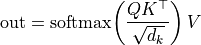
import math

def attention_head(q_h, k_cache, v_cache, head_dim: int):
    """
    q_h:     [head_dim]
    k_cache: [seq_len, head_dim]
    v_cache: [seq_len, head_dim]
    """
    scale = 1.0 / math.sqrt(head_dim)
    # QK^T / sqrt(d_k): [seq_len]
    scores = ops.mul(ops.matmul(k_cache, ops.reshape(q_h, [head_dim, 1])), scale)
    scores = ops.reshape(scores, [-1])
    weights = ops.softmax(scores, axis=0)           # [seq_len]
    # 重み付き和: [head_dim]
    weights_col = ops.reshape(weights, [1, -1])     # [1, seq_len]
    out = ops.matmul(weights_col, v_cache)          # [1, head_dim]
    return ops.reshape(out, [head_dim])
27.7. Mojo カスタム ops の組み込み方(概念)
標準の ops にない演算や、特定のハードウェアに最適化したい演算は
Mojo で custom op として書いて Graph に組み込めます。
# my_op.mojo
from max.graph import CustomOp, TensorRef

struct MyFusedOp(CustomOp):
    fn forward(self, x: TensorRef[DType.float32]) -> TensorRef[DType.float32]:
        # カスタムの高速実装
        ...
# Python 側でグラフに組み込む
from max.graph import ops
out = ops.custom("my_fused_op", inputs=[x], output_types=[x.type])
MAX の custom op は、演算の核だけを Mojo で書き、グラフ全体の最適化(融合・スケジューリング)は MAX に任せるというハイブリッドな設計です。
27.8. まとめ
概念 |
役割 |
対応する microgpt の概念 |
|---|---|---|
|
計算の設計図 |
Tape(ノードの列) |
|
入力の型・形状の宣言 |
— |
|
演算ノードの追加 |
|
|
学習パラメータの宣言 |
|
|
層のまとまり |
StateDict の各行列 |
|
コンパイル・実行 |
|
次章では、Mojo 版 microgpt で学習した重みを MAX に渡し、推論を MAX で実行する具体例を示します。
27.9. 次に読む章
28 章(microgpt Mojo 版を MAX で高速化する)へ進みます。