3. 最小の ASGI HTTP アプリ
2 章(なぜ ASGI が必要になったのか)で ASGI の仕様を理論的に理解しました。 本章では実際に手を動かしてコードを書きます。
注釈
Vol.1「WSGI が生まれた背景」で WSGI の最小アプリを wsgiref.simple_server で動かしたのと同様に、本章では ASGI の最小アプリを Uvicorn で動かします。scope、receive、send が実際にどのようなデータをやり取りするかを体感しましょう。
3.1. Hello World
まず最小の ASGI アプリケーションを書いて動かします。
# hello_asgi.py
async def application(scope, receive, send):
    assert scope["type"] == "http"

    # リクエストボディを受信(GETでも呼び出す必要がある)
    await receive()

    body = b"Hello, ASGI World!"

    await send({
        "type": "http.response.start",
        "status": 200,
        "headers": [
            [b"content-type", b"text/plain; charset=utf-8"],
            [b"content-length", str(len(body)).encode()],
        ],
    })

    await send({
        "type": "http.response.body",
        "body": body,
    })
Uvicorn で起動します。
Tip
Uvicorn がインストールされていない場合は、先に pip install uvicorn を実行してください。
pip install uvicorn
uvicorn hello_asgi:application --host 127.0.0.1 --port 8000
別のターミナルから確認します。
curl -v http://127.0.0.1:8000/
> GET / HTTP/1.1
> Host: 127.0.0.1:8000
> User-Agent: curl/8.7.1
> Accept: */*
>
< HTTP/1.1 200 OK
< content-type: text/plain; charset=utf-8
< content-length: 18
< date: Sun, 27 Apr 2026 12:00:00 GMT
< server: uvicorn
<
Hello, ASGI World!
Vol.1「WSGI が生まれた背景」の WSGI 版と比較します。
# WSGI — wsgiref で動かした
def application(environ, start_response):
    body = b"Hello, WSGI World!"
    start_response("200 OK", [
        ("Content-Type", "text/plain; charset=utf-8"),
        ("Content-Length", str(len(body)))
    ])
    return [body]

# ASGI — Uvicorn で動かした
async def application(scope, receive, send):
    await receive()
    body = b"Hello, ASGI World!"
    await send({"type": "http.response.start", "status": 200,
                "headers": [[b"content-type", b"text/plain; charset=utf-8"],
                             [b"content-length", str(len(body)).encode()]]})
    await send({"type": "http.response.body", "body": body})
コードの量は増えていますが、やっていることの本質は同じです。
リクエスト情報を受け取る
ステータスとヘッダーを送る
ボディを送る
WSGI ではこれが「関数呼び出しと返却」で表現され、ASGI では「イベントの送受信」で表現されているという違いです。
scope の中身を確認するために、ダンプ用のアプリケーションを作ります。
Vol.1「WSGI が生まれた背景」で environ をダンプしたのと同じ発想です。
# scope_dump.py
import json

async def application(scope, receive, send):
    assert scope["type"] == "http"
    await receive()

    # headers はバイト列なので文字列に変換
    scope_display = {}
    for key, value in scope.items():
        if key == "headers":
            scope_display[key] = [
                [name.decode("latin-1"), val.decode("latin-1")]
                for name, val in value
            ]
        elif isinstance(value, bytes):
            scope_display[key] = value.decode("latin-1")
        else:
            scope_display[key] = repr(value)

    body = json.dumps(scope_display, indent=2, ensure_ascii=False).encode("utf-8")

    await send({
        "type": "http.response.start",
        "status": 200,
        "headers": [
            [b"content-type", b"application/json; charset=utf-8"],
            [b"content-length", str(len(body)).encode()],
        ],
    })
    await send({
        "type": "http.response.body",
        "body": body,
    })
uvicorn scope_dump:application --port 8000
curl http://127.0.0.1:8000/hello?name=Taro
出力から type, method, path, query_string, headers, server, client の各キーの実際の値を確認できます。
2.6 章(scope を理解する)で解説した内容と照らし合わせてみてください。
3.2. http.response.start
http.response.start イベントはレスポンスのステータスコードとヘッダーをサーバに送信します。
WSGI の start_response("200 OK", headers) に相当する処理です。
注釈
WSGI との対応を整理すると、http.response.start が start_response の役割を担っています。ただし、後述のように ASGI では整数のステータスコードを使う点が異なります。
await send({
    "type": "http.response.start",
    "status": 200,
    "headers": [
        [b"content-type", b"text/plain; charset=utf-8"],
        [b"content-length", b"18"],
    ],
})
このイベントの構成要素を確認します。
フィールド |
型 |
説明 |
|---|---|---|
|
文字列 |
常に |
|
整数 |
HTTPステータスコード(例: |
|
リスト |
バイト列ペアのリスト |
statusは整数のステータスコードで、WSGI の"200 OK"のような理由フレーズを含む文字列ではありません。2.6 章(scope を理解する)で触れた通り、HTTP/2 以降では理由フレーズが廃止されているため、ASGI では最初から整数だけを扱います。headersはバイト列のペアのリストです。WSGI では文字列タプルのリスト[("Content-Type", "text/plain")]でしたが、ASGI ではバイト列のリスト[[b"content-type", b"text/plain"]]です。ヘッダー名は小文字で記述するのが慣例です。HTTP/2 ではヘッダー名が小文字に正規化されるため、ASGI もこの慣例に従っています。
ヘッダーのバイト列変換を毎回手動で書くのは煩雑なため、ヘルパー関数を用意すると便利です。
def encode_headers(header_dict):
    """文字列辞書をASGIヘッダー形式に変換"""
    return [
        [name.lower().encode("latin-1"), value.encode("latin-1")]
        for name, value in header_dict.items()
    ]

# 使用例
headers = encode_headers({
    "Content-Type": "application/json; charset=utf-8",
    "Content-Length": "52",
    "X-Request-Id": "abc-123",
})
http.response.start の送信タイミングに関する制約を実験で確認します。
# NG: http.response.start を2回送る
async def double_start(scope, receive, send):
    await receive()
    await send({"type": "http.response.start", "status": 200,
                "headers": [[b"content-type", b"text/plain"]]})
    await send({"type": "http.response.start", "status": 404,  # 2回目
                "headers": [[b"content-type", b"text/plain"]]})
    # → RuntimeError: Unexpected ASGI message 'http.response.start'
Uvicorn はこの違反を検出して RuntimeError を送出します。
警告
一度送信したステータスとヘッダーは取り消せません。これは WSGI で start_response を呼んだ後にステータスを変更できない(exc_info を除く)のと同じ制約です。ビジネスロジックの結果に応じてステータスコードを変えたい場合は、send を呼ぶ前にすべての判断を完了させる必要があります。
3.3. http.response.body
http.response.body イベントはレスポンスボディをサーバに送信します。
WSGI のイテラブル返却に相当します。
注釈
http.response.start の後に必ず http.response.body を送信してください。送信しないと、クライアントはレスポンスを待ち続けてしまいます。
最もシンプルなケースでは、ボディ全体を1回の send で送信します。
await send({
    "type": "http.response.body",
    "body": b"Hello, ASGI World!",
})
more_body キーを省略した場合、デフォルトで False が適用され、これが最後のチャンクであることを意味します。
more_body: True を使ったストリーミング送信も試してみましょう。
# streaming_demo.py
import asyncio

async def application(scope, receive, send):
    assert scope["type"] == "http"
    await receive()

    await send({
        "type": "http.response.start",
        "status": 200,
        "headers": [
            [b"content-type", b"text/plain; charset=utf-8"],
            # Content-Length を設定しない → chunked encoding が使われる
        ],
    })

    for i in range(5):
        chunk = f"Chunk {i}: Hello from ASGI streaming!\n".encode("utf-8")
        await send({
            "type": "http.response.body",
            "body": chunk,
            "more_body": True,
        })
        await asyncio.sleep(1)

    await send({
        "type": "http.response.body",
        "body": b"Stream complete.\n",
        "more_body": False,
    })
uvicorn streaming_demo:application --port 8000
curl -N http://127.0.0.1:8000/
curl -N(--no-buffer)を指定すると、チャンクが届くたびにリアルタイムで表示されます。
1秒ごとに Chunk 0, Chunk 1, … と表示され、5秒後に Stream complete. が表示されて接続が閉じます。
Content-Length ヘッダーを設定していないため、Uvicorn は自動的に Transfer-Encoding: chunked を適用します。
Vol.1「HTTP は何をやりとりしているのか」で学んだ chunked transfer encoding がここで使われていることを、curl -v の出力で確認できます。
more_body フラグの動作をまとめると以下のようになります。
# パターン1: 一括送信(小さなレスポンス)
await send({"type": "http.response.body", "body": b"all data"})
# more_body 省略 → False → これで完了

# パターン2: ストリーミング送信(大きなレスポンスやリアルタイム送信)
await send({"type": "http.response.body", "body": b"part 1", "more_body": True})
await send({"type": "http.response.body", "body": b"part 2", "more_body": True})
await send({"type": "http.response.body", "body": b"part 3", "more_body": False})
# more_body: False で完了

# パターン3: ボディなしのレスポンス(204 No Content など)
await send({"type": "http.response.body", "body": b""})
重要
http.response.start の後に http.response.body を送らずに application が return してしまうと、クライアントはレスポンスを待ち続けます。すべてのコードパスで http.response.body(more_body: False)が送信されることを保証するのは、ASGI アプリケーション開発者の責務です。フレームワークはこの保証を内部で提供しています。
最小の ASGI アプリを動かし、scope のダンプ、http.response.start の制約、http.response.body の一括送信とストリーミング送信を実際に確認しました。
Vol.1「まずは 1 リクエストだけ処理するサーバを作る」で socket から HTTP サーバを作り、Vol.1「WSGI が生まれた背景」で WSGI アプリを作ったのと同じ「手を動かして理解する」プロセスです。

次節ではルーティングと JSON レスポンスを加え、ASGI アプリを実用的な形に拡張します。
3.4. request body を受け取る
前節で ASGI の最小アプリを動かし、レスポンスの送信を実装しました。 本節ではリクエスト側に目を向け、クライアントから送信されたボディを受信する処理を実装します。
注釈
Vol.1「まずは 1 リクエストだけ処理するサーバを作る」で recv() のループを書いてリクエストボディを読み取ったのと同じことを、ASGI のイベントモデルで行います。
3.4.1. http.request イベント
receive を呼び出すと、サーバからリクエストボディを含むイベント辞書が返されます。
実際に何が届くかを確認するために、受信したイベントをそのまま表示するアプリケーションを書きます。
# receive_dump.py
import json

async def application(scope, receive, send):
    assert scope["type"] == "http"

    event = await receive()

    # イベントの中身を確認用に整形
    event_display = {
        "type": event.get("type"),
        "body_length": len(event.get("body", b"")),
        "body_preview": event.get("body", b"")[:200].decode("utf-8", errors="replace"),
        "more_body": event.get("more_body", False),
    }

    body = json.dumps(event_display, indent=2, ensure_ascii=False).encode("utf-8")

    await send({
        "type": "http.response.start",
        "status": 200,
        "headers": [
            [b"content-type", b"application/json; charset=utf-8"],
            [b"content-length", str(len(body)).encode()],
        ],
    })
    await send({
        "type": "http.response.body",
        "body": body,
    })
uvicorn receive_dump:application --port 8000

# GET リクエスト(ボディなし)
curl http://127.0.0.1:8000/
# → {"type": "http.request", "body_length": 0, "body_preview": "", "more_body": false}

# POST リクエスト(JSON ボディ)
curl -X POST http://127.0.0.1:8000/users \
  -H "Content-Type: application/json" \
  -d '{"name": "Taro", "email": "[email protected]"}'
# → {"type": "http.request", "body_length": 46, "body_preview": "{\"name\": \"Taro\",...}", "more_body": false}
http.request イベントは以下のフィールドを持ちます。
フィールド |
説明 |
|---|---|
|
常に |
|
リクエストボディのバイト列(ボディがない場合は |
|
後続チャンクの有無を示す真偽値 |
WSGI では environ["wsgi.input"].read(content_length) という同期的なストリーム読み取りでボディを取得していました。
サーバがストリームの裏側でバッファリングを行ってくれるため、アプリケーション側はチャンクを意識する必要がほとんどありませんでした。
ASGI では receive が返すイベントがチャンク単位であるため、アプリケーションが明示的にチャンクを結合する責務を持ちます。
3.4.2. more_body
小さなリクエストボディでは more_body が False で届き、1回の receive で全データが取得できます。
しかし大きなリクエストボディでは、ASGI サーバがボディを複数のチャンクに分割して送信します。
この挙動を実際に確認してみましょう。
# chunked_receive_dump.py
import json

async def application(scope, receive, send):
    assert scope["type"] == "http"

    chunks = []
    chunk_count = 0

    while True:
        event = await receive()
        chunk = event.get("body", b"")
        more = event.get("more_body", False)
        chunk_count += 1
        chunks.append({
            "chunk_number": chunk_count,
            "chunk_size": len(chunk),
            "more_body": more,
        })
        if not more:
            break

    result = {
        "total_chunks": chunk_count,
        "total_bytes": sum(c["chunk_size"] for c in chunks),
        "chunks": chunks,
    }

    body = json.dumps(result, indent=2).encode("utf-8")
    await send({
        "type": "http.response.start",
        "status": 200,
        "headers": [
            [b"content-type", b"application/json; charset=utf-8"],
            [b"content-length", str(len(body)).encode()],
        ],
    })
    await send({
        "type": "http.response.body",
        "body": body,
    })
uvicorn chunked_receive_dump:application --port 8000

# 小さなボディ(1チャンクで届く)
curl -X POST http://127.0.0.1:8000/ \
  -d '{"name": "Taro"}'
# → {"total_chunks": 1, "total_bytes": 16, "chunks": [{"chunk_number": 1, "chunk_size": 16, "more_body": false}]}

# 大きなボディ(複数チャンクに分割される)
python -c "print('x' * 200000)" | curl -X POST http://127.0.0.1:8000/ \
  -H "Content-Type: text/plain" \
  --data-binary @-
# → {"total_chunks": 4, "total_bytes": 200001, "chunks": [{"chunk_number": 1, "chunk_size": 65536, "more_body": true}, ...]}
200KB のデータを送信すると、Uvicorn はデフォルトで約65KBごとにチャンクを分割して receive に渡します。
このチャンクサイズは ASGI サーバの実装に依存し、アプリケーションが制御するものではありません。
アプリケーションは「何回
receiveを呼べばボディが完結するか」を事前に知ることができませんmore_bodyフラグを頼りにループする必要があります
注意
more_body が True の場合、まだ後続のチャンクがあるため receive を再度呼び出してください。more_body が False になった時点で、そのイベントの body が最後のチャンクです。このフラグを無視して1回の receive だけでボディを取得しようとすると、2.11 章(トラブルシューティングの観点)で解説した「body の受信ループ漏れ」バグになります。
3.4.3. 全文を組み立てる

more_body ループを毎回書くのは冗長なため、再利用可能なヘルパー関数を作りましょう。
# helpers.py

async def read_body(receive, max_size=10 * 1024 * 1024):
    """
    リクエストボディを完全に読み取って返す。
    max_size を超えた場合は ValueError を送出する。
    """
    body = b""
    while True:
        event = await receive()
        chunk = event.get("body", b"")
        body += chunk
        if len(body) > max_size:
            raise ValueError(f"Request body exceeds limit: {max_size} bytes")
        if not event.get("more_body", False):
            break
    return body
このヘルパーには3つの設計上の工夫が含まれています。
more_bodyがFalseになるまでループを継続するため、チャンクサイズやチャンク数に依存しませんmax_sizeパラメータで上限を設けることで、悪意ある巨大リクエストによるメモリ枯渇を防ぎますevent.get("body", b"")でキーが存在しない場合にも対応しています
Tip
max_size のデフォルト値(10MB)はあくまで目安です。API の用途に応じて適切な値に調整してください。
このヘルパーを使って JSON を受け取る ASGI アプリケーションを実装します。
# json_app.py
import json
from helpers import read_body

async def send_json(send, data, status=200):
    body = json.dumps(data, ensure_ascii=False).encode("utf-8")
    await send({
        "type": "http.response.start",
        "status": status,
        "headers": [
            [b"content-type", b"application/json; charset=utf-8"],
            [b"content-length", str(len(body)).encode()],
        ],
    })
    await send({
        "type": "http.response.body",
        "body": body,
    })

async def send_error(send, status, message):
    await send_json(send, {"error": message}, status=status)

USERS = {
    1: {"id": 1, "name": "Taro Yamada", "email": "[email protected]"},
    2: {"id": 2, "name": "Hanako Sato", "email": "[email protected]"},
}

async def application(scope, receive, send):
    if scope["type"] != "http":
        return

    method = scope["method"]
    path = scope["path"]

    if path == "/users" and method == "GET":
        await receive()
        await send_json(send, list(USERS.values()))

    elif path == "/users" and method == "POST":
        # ボディを完全に受信
        try:
            body = await read_body(receive, max_size=1 * 1024 * 1024)
        except ValueError as e:
            await send_error(send, 413, str(e))
            return

        # Content-Type の確認
        content_type = ""
        for name, value in scope.get("headers", []):
            if name == b"content-type":
                content_type = value.decode("latin-1")
                break

        if "application/json" not in content_type:
            await send_error(send, 400, "Content-Type must be application/json")
            return

        # JSON パース
        try:
            data = json.loads(body.decode("utf-8"))
        except (json.JSONDecodeError, UnicodeDecodeError) as e:
            await send_error(send, 400, f"Invalid JSON: {e}")
            return

        # ユーザー作成
        new_id = max(USERS.keys()) + 1 if USERS else 1
        new_user = {
            "id": new_id,
            "name": data.get("name", ""),
            "email": data.get("email", ""),
        }
        USERS[new_id] = new_user
        await send_json(send, new_user, status=201)

    else:
        await receive()
        await send_error(send, 404, f"Not Found: {path}")
uvicorn json_app:application --port 8000

# ユーザー一覧
curl http://127.0.0.1:8000/users
# → [{"id": 1, "name": "Taro Yamada", ...}, {"id": 2, ...}]

# ユーザー作成
curl -X POST http://127.0.0.1:8000/users \
  -H "Content-Type: application/json" \
  -d '{"name": "Jiro Suzuki", "email": "[email protected]"}'
# → {"id": 3, "name": "Jiro Suzuki", "email": "[email protected]"}

# 不正なJSON
curl -X POST http://127.0.0.1:8000/users \
  -H "Content-Type: application/json" \
  -d 'not json'
# → {"error": "Invalid JSON: ..."}

# Content-Type なし
curl -X POST http://127.0.0.1:8000/users \
  -d '{"name": "Test"}'
# → {"error": "Content-Type must be application/json"}
Vol.1「WSGI が生まれた背景」で書いた WSGI 版の JSON アプリ(json_wsgi.py)と比較すると、ルーティング、ボディ読み取り、JSON パース、エラーハンドリングの構造はほぼ同じです。
項目 |
WSGI |
ASGI |
|---|---|---|
ボディ読み取り |
|
|
レスポンス送信 |
|
|
処理の本質は変わっておらず、表現形式が同期から非同期に移行しただけです。
Vol.1「まずは 1 リクエストだけ処理するサーバを作る」で自作 HTTP サーバに書いた receive_request 関数が recv() ループでヘッダー終端とボディを読み取っていたことを思い出してください。
WSGI サーバがそのループを隠蔽して wsgi.input ストリームを提供し、ASGI サーバがさらにそれをイベント形式に変換して receive で提供しています。
抽象化の形は変わっていますが、「TCP のバイトストリームからリクエストデータを取り出す」という根本的な処理は、どの層でも同じです。
次節ではルーティングをより体系的に整理し、パスパラメータの抽出やメソッド別の分岐を加えて、ASGI アプリケーションをフレームワークに近づけていきます。
3.5. ルーティングを自作してみる
前節でリクエストボディの受信を実装し、if path == "/users" and method == "POST" という分岐でルーティングを行いました。
Vol.1「まずは 1 リクエストだけ処理するサーバを作る」の自作 HTTP サーバでも、Vol.1「WSGI が生まれた背景」の WSGI アプリでも、同じ if/elif/else パターンを使ってきました。
本節ではこの繰り返しパターンを抽象化し、フレームワークのルーティング機構の原始的な形を ASGI 上に自作します。
注釈
ルーティングの自作を通じて、Flask や FastAPI が内部でどのような処理を行っているかを理解できます。フレームワークを使う前に仕組みを知っておくと、問題が起きたときの調査が格段に楽になります。
3.5.1. path と method で分岐
まず、前節までのコードで繰り返されてきたパターンを振り返ります。
async def application(scope, receive, send):
    method = scope["method"]
    path = scope["path"]

    if path == "/" and method == "GET":
        await handle_index(scope, receive, send)
    elif path == "/users" and method == "GET":
        await handle_user_list(scope, receive, send)
    elif path == "/users" and method == "POST":
        await handle_user_create(scope, receive, send)
    elif path == "/about" and method == "GET":
        await handle_about(scope, receive, send)
    else:
        await receive()
        await send_error(send, 404, f"Not Found: {path}")
エンドポイントが5つ、10個と増えていくと、この if/elif チェーンは際限なく伸びていきます。
新しいエンドポイントを追加するたびに分岐の末尾に条件を書き足す必要があります
パスの文字列を間違えてもエラーにならず、ただ404が返るだけで原因に気づきにくいです
Vol.1「まずは 1 リクエストだけ処理するサーバを作る」で自作サーバに同じ問題が発生しました
Vol.1「WSGI の上に何が必要になるのか」で Werkzeug や Bottle がルーティング機構でこの問題を解決していることを確認しました
さらに、パスパラメータの問題もあります。/users/42/ のようなパスからユーザーIDを抽出するには、文字列操作が必要です。
elif path.startswith("/users/") and method == "GET":
    parts = path.strip("/").split("/")
    if len(parts) == 2:
        try:
            user_id = int(parts[1])
        except ValueError:
            await send_error(send, 400, "Invalid user ID")
            return
        await handle_user_detail(scope, receive, send, user_id)
この種のパース処理がエンドポイントごとに散在すると、コードの見通しが悪くなり、バグの温床になります。
3.5.2. シンプルなディスパッチャ
ルーティングを宣言的に記述し、パスパラメータの抽出を自動化する最小のディスパッチャを作りましょう。
# router.py
import re
from helpers import read_body, send_json, send_error


class Route:
    """1つのルート定義を保持する"""
    def __init__(self, method, path_pattern, handler):
        self.method = method.upper()
        self.handler = handler
        # パスパターンを正規表現に変換
        # "/users/{user_id}" → "^/users/(?P<user_id>[^/]+)$"
        regex = re.sub(r"\{(\w+)\}", r"(?P<\1>[^/]+)", path_pattern)
        self.pattern = re.compile(f"^{regex}$")

    def match(self, method, path):
        """メソッドとパスがこのルートにマッチするか判定"""
        if self.method != method:
            return None
        m = self.pattern.match(path)
        if m:
            return m.groupdict()
        return None


class Router:
    """ルートの登録とディスパッチを行う"""
    def __init__(self):
        self.routes = []

    def route(self, method, path_pattern):
        """デコレータとしてルートを登録"""
        def decorator(handler):
            self.routes.append(Route(method, path_pattern, handler))
            return handler
        return decorator

    def get(self, path_pattern):
        return self.route("GET", path_pattern)

    def post(self, path_pattern):
        return self.route("POST", path_pattern)

    def put(self, path_pattern):
        return self.route("PUT", path_pattern)

    def delete(self, path_pattern):
        return self.route("DELETE", path_pattern)

    async def dispatch(self, scope, receive, send):
        """scope からメソッドとパスを取り出し、マッチするルートを探す"""
        if scope["type"] != "http":
            return

        method = scope["method"]
        path = scope["path"]

        for route in self.routes:
            params = route.match(method, path)
            if params is not None:
                await route.handler(scope, receive, send, **params)
                return

        # どのルートにもマッチしなかった
        await receive()
        await send_error(send, 404, f"Not Found: {path}")

    async def __call__(self, scope, receive, send):
        """ASGI application として呼び出し可能"""
        await self.dispatch(scope, receive, send)
Route クラスはパスパターンを正規表現に変換します。
"/users/{user_id}"は"^/users/(?P<user_id>[^/]+)$"になります/users/42にマッチした場合に{"user_id": "42"}を返します1 章(Django を WSGI 視点で見る)で Django の
path('<int:user_id>/', ...)が内部で正規表現に変換されていたのと同じ発想ですただし Django のパスコンバータのような型変換は行わず、値は常に文字列で渡します
Router クラスはルートのリストを保持し、デコレータでルートを登録する API を提供します。
dispatch メソッドがルートを上から順に走査し、最初にマッチしたルートのハンドラを呼び出します。
どのルートにもマッチしなければ 404 を返します。
このディスパッチャを使ってアプリケーションを書き直します。
# app.py
import json
from router import Router
from helpers import read_body, send_json, send_error

app = Router()

USERS = {
    1: {"id": 1, "name": "Taro Yamada", "email": "[email protected]"},
    2: {"id": 2, "name": "Hanako Sato", "email": "[email protected]"},
}


@app.get("/")
async def index(scope, receive, send):
    await receive()
    await send_json(send, {"message": "Welcome to the ASGI app!"})


@app.get("/users")
async def user_list(scope, receive, send):
    await receive()
    await send_json(send, list(USERS.values()))


@app.get("/users/{user_id}")
async def user_detail(scope, receive, send, user_id):
    await receive()
    try:
        uid = int(user_id)
    except ValueError:
        await send_error(send, 400, "Invalid user ID")
        return
    user = USERS.get(uid)
    if not user:
        await send_error(send, 404, f"User {uid} not found")
        return
    await send_json(send, user)


@app.post("/users")
async def user_create(scope, receive, send):
    body = await read_body(receive)

    content_type = ""
    for name, value in scope.get("headers", []):
        if name == b"content-type":
            content_type = value.decode("latin-1")
            break

    if "application/json" not in content_type:
        await send_error(send, 400, "Content-Type must be application/json")
        return

    try:
        data = json.loads(body.decode("utf-8"))
    except (json.JSONDecodeError, UnicodeDecodeError) as e:
        await send_error(send, 400, f"Invalid JSON: {e}")
        return

    new_id = max(USERS.keys()) + 1 if USERS else 1
    new_user = {"id": new_id, "name": data.get("name", ""), "email": data.get("email", "")}
    USERS[new_id] = new_user
    await send_json(send, new_user, status=201)


@app.delete("/users/{user_id}")
async def user_delete(scope, receive, send, user_id):
    await receive()
    try:
        uid = int(user_id)
    except ValueError:
        await send_error(send, 400, "Invalid user ID")
        return
    if uid not in USERS:
        await send_error(send, 404, f"User {uid} not found")
        return
    deleted = USERS.pop(uid)
    await send_json(send, {"deleted": deleted})
uvicorn app:app --port 8000

curl http://127.0.0.1:8000/
# → {"message": "Welcome to the ASGI app!"}

curl http://127.0.0.1:8000/users
# → [{"id": 1, ...}, {"id": 2, ...}]

curl http://127.0.0.1:8000/users/1
# → {"id": 1, "name": "Taro Yamada", "email": "[email protected]"}

curl -X POST http://127.0.0.1:8000/users \
  -H "Content-Type: application/json" \
  -d '{"name": "Jiro", "email": "[email protected]"}'
# → {"id": 3, "name": "Jiro", "email": "[email protected]"}

curl -X DELETE http://127.0.0.1:8000/users/3
# → {"deleted": {"id": 3, "name": "Jiro", "email": "[email protected]"}}

curl http://127.0.0.1:8000/nonexistent
# → {"error": "Not Found: /nonexistent"}
前節の if/elif による分岐と比較すると、次の改善が確認できます。
ルートの定義がデコレータで宣言的になり、ハンドラ関数とパスパターンの対応が一目で分かります
パスパラメータの抽出が自動化され、ハンドラ関数のキーワード引数として渡されます
新しいエンドポイントの追加は関数を書いてデコレータを付けるだけで完了し、既存のコードを修正する必要がありません
Tip
この自作ディスパッチャは Bottle の @route デコレータ(Vol.1「WSGI の上に何が必要になるのか」)や FastAPI の @app.get デコレータの原始的な形です。実際のフレームワークではこれに加えて、パスパラメータの型変換、クエリパラメータの抽出、リクエスト/レスポンスオブジェクトの抽象化、ミドルウェアの統合、例外ハンドリング、バリデーションといった機能が積み重ねられています。
4 章(FastAPI を ASGI 視点で見る)で FastAPI の内部を追跡する際に、この自作ディスパッチャの延長線上にある構造を確認していきます。

次節では ASGI ミドルウェアを自作し、WSGI ミドルウェア(Vol.1「WSGI の上に何が必要になるのか」)との構造の違いを確認します。
3.6. ASGI ミドルウェアを書く
前節でルーティングを自作し、ASGI アプリケーションがフレームワークに近づいてきました。 本節ではミドルウェアを実装します。
注釈
Vol.1「WSGI の上に何が必要になるのか」で WSGI ミドルウェアを書いた経験があるため、「アプリケーションをラップして前後に処理を挟む」という基本概念はすでに理解しています。ASGI ミドルウェアは同じ概念を非同期イベントモデルの上で表現します。
3.6.1. アプリをラップする構造
WSGI ミドルウェアの基本構造を振り返ります。
# WSGI ミドルウェア(第5章より)
class WSGIMiddleware:
    def __init__(self, app):
        self.app = app

    def __call__(self, environ, start_response):
        # 前処理
        response = self.app(environ, start_response)
        # 後処理
        return response
ASGI ミドルウェアも同じ構造です。__init__ で内側のアプリケーションを受け取り、__call__ を async def にして scope, receive, send を受け取ります。
# ASGI ミドルウェア
class ASGIMiddleware:
    def __init__(self, app):
        self.app = app

    async def __call__(self, scope, receive, send):
        # 前処理
        await self.app(scope, receive, send)
        # 後処理
WSGI と ASGI のミドルウェアには構造的な違いが一つあります。
項目 |
WSGI ミドルウェア |
ASGI ミドルウェア |
|---|---|---|
ステータス/ヘッダーの傍受 |
|
|
リクエストボディの傍受 |
|
|
ASGI ではステータス、ヘッダー、ボディのすべてが send を通じてイベントとして送信されるため、レスポンスの内容を傍受するには send をラップする必要があります。
同様に、リクエストボディを傍受するには receive をラップします。
class ASGIMiddleware:
    def __init__(self, app):
        self.app = app

    async def __call__(self, scope, receive, send):
        # receive をラップしてリクエストを傍受
        async def wrapped_receive():
            event = await receive()
            # リクエストイベントの検査・加工
            return event

        # send をラップしてレスポンスを傍受
        async def wrapped_send(event):
            # レスポンスイベントの検査・加工
            await send(event)

        await self.app(scope, wrapped_receive, wrapped_send)
ミドルウェアのチェーンは WSGI と同様に入れ子構造で構築します。
Tip
外側のミドルウェアほどリクエスト処理の順番が早く、レスポンスの send イベントは逆順に通過します。ミドルウェアを追加する順番に注意してください。
app = Router()
# デコレータでルートを登録 ...

# ミドルウェアを外側から順にラップ
app = ErrorHandlingMiddleware(app)
app = HeaderMiddleware(app)
app = LoggingMiddleware(app)
# リクエストは LoggingMiddleware → HeaderMiddleware → ErrorHandlingMiddleware → Router の順に通過
3.6.2. リクエストログ
Vol.1「WSGI の上に何が必要になるのか」で書いた WSGI のロギングミドルウェアを ASGI で再実装します。 記録する情報は以下のとおりです。
HTTPメソッド
パス
ステータスコード
処理時間
# middleware.py
import time
import sys


class LoggingMiddleware:
    def __init__(self, app):
        self.app = app

    async def __call__(self, scope, receive, send):
        if scope["type"] != "http":
            await self.app(scope, receive, send)
            return

        method = scope["method"]
        path = scope["path"]
        start_time = time.time()

        # ステータスコードを傍受するために send をラップ
        status_code = None

        async def logging_send(event):
            nonlocal status_code
            if event["type"] == "http.response.start":
                status_code = event["status"]
            await send(event)

        try:
            await self.app(scope, receive, logging_send)
        finally:
            elapsed = (time.time() - start_time) * 1000
            status = status_code or "???"
            print(
                f"{method} {path} → {status} ({elapsed:.1f}ms)",
                file=sys.stderr,
            )
WSGI 版と比較すると、ステータスコードの取得方法が異なります。
WSGI では start_response をラップして引数からステータスを取得しましたが、ASGI では send をラップして http.response.start イベントからステータスを取得します。
レスポンスの内容がすべて send のイベントとして流れるため、send のラッパーがレスポンスの傍受ポイントになります。
注釈
ロギングミドルウェアでは send のラッパーを使ってステータスコードを記録しています。この仕組みは ASGI ミドルウェアの基本パターンであり、他のミドルウェア(ヘッダー追加、CORS など)でも同様に使います。
uvicorn app:app --port 8000
# ログ出力例:
# GET / → 200 (0.3ms)
# GET /users → 200 (0.5ms)
# POST /users → 201 (1.2ms)
# GET /nonexistent → 404 (0.2ms)
3.6.3. 例外処理
アプリケーション内で未処理例外が発生した場合に500レスポンスを返すミドルウェアを実装します。 Vol.1「WSGI の上に何が必要になるのか」の WSGI 版と同じ役割です。
重要
例外ミドルウェアを実装する際は、http.response.start が送信済みかどうかを追跡する必要があります。送信済みの場合はステータスコードを変更できないため、対処法が異なります。
import traceback


class ErrorHandlingMiddleware:
    def __init__(self, app, debug=False):
        self.app = app
        self.debug = debug

    async def __call__(self, scope, receive, send):
        if scope["type"] != "http":
            await self.app(scope, receive, send)
            return

        response_started = False

        async def guarded_send(event):
            nonlocal response_started
            if event["type"] == "http.response.start":
                response_started = True
            await send(event)

        try:
            await self.app(scope, receive, guarded_send)
        except Exception:
            traceback.print_exc(file=sys.stderr)

            if response_started:
                # ステータスとヘッダーは送信済み → レスポンスを修正できない
                # 不完全なレスポンスのまま接続を閉じるしかない
                return

            if self.debug:
                body = traceback.format_exc().encode("utf-8")
            else:
                body = b"Internal Server Error"

            await send({
                "type": "http.response.start",
                "status": 500,
                "headers": [
                    [b"content-type", b"text/plain; charset=utf-8"],
                    [b"content-length", str(len(body)).encode()],
                ],
            })
            await send({
                "type": "http.response.body",
                "body": body,
            })
response_started フラグで http.response.start が送信済みかどうかを追跡しています。
例外が
http.response.startの前に発生した場合: ミドルウェアが500レスポンスを生成して返せます例外が
http.response.startの後に発生した場合: ステータスとヘッダーはすでにクライアントに送信済みで取り消せません。レスポンスが不完全なまま接続が閉じられ、クライアントは壊れたレスポンスを受け取ります
警告
この制約は WSGI でも同じでした。Vol.1「WSGI の上に何が必要になるのか」で解説した start_response の exc_info 引数は、まだレスポンスが送信されていない場合にのみステータスの再設定を許可していました。ASGI でも HTTP の構造上「送信済みのステータスは撤回できない」という根本的な制約は変わりません。
3.6.4. ヘッダー追加
全レスポンスにセキュリティヘッダーを追加するミドルウェアを実装します。
Tip
セキュリティヘッダーを全レスポンスに一括で付与するには、ミドルウェアで http.response.start イベントを傍受するのが最も簡単な方法です。各ハンドラ関数で個別に設定する必要はありません。
class SecurityHeadersMiddleware:
    def __init__(self, app):
        self.app = app
        self.security_headers = [
            [b"x-content-type-options", b"nosniff"],
            [b"x-frame-options", b"DENY"],
            [b"x-xss-protection", b"1; mode=block"],
        ]

    async def __call__(self, scope, receive, send):
        if scope["type"] != "http":
            await self.app(scope, receive, send)
            return

        async def add_headers_send(event):
            if event["type"] == "http.response.start":
                existing_headers = list(event.get("headers", []))
                existing_headers.extend(self.security_headers)
                event = {
                    "type": event["type"],
                    "status": event["status"],
                    "headers": existing_headers,
                }
            await send(event)

        await self.app(scope, receive, add_headers_send)
http.response.start イベントを傍受し、headers リストにセキュリティヘッダーを追加してからサーバに送信します。
元のイベント辞書を直接変更するのではなく、新しい辞書を作成して渡しています。
元の辞書を変更しても多くの場合は動作しますが、ASGI サーバの実装によっては元のイベントを参照している可能性があるため、新しい辞書を作る方が安全です。
注釈
event = {**event, "headers": existing_headers} のようにスプレッド構文で辞書をコピーする書き方もよく使われます。どちらの方法でも結果は同じです。
curl -v http://127.0.0.1:8000/
# < x-content-type-options: nosniff
# < x-frame-options: DENY
# < x-xss-protection: 1; mode=block
リクエスト ID を付与するミドルウェアも同じパターンで実装できます。
注釈
リクエスト ID はログの追跡に役立ちます。クライアントにもレスポンスヘッダーで返すことで、ブラウザのネットワークタブやサーバのログを突き合わせてデバッグできます。
import uuid


class RequestIdMiddleware:
    def __init__(self, app):
        self.app = app

    async def __call__(self, scope, receive, send):
        if scope["type"] != "http":
            await self.app(scope, receive, send)
            return

        request_id = str(uuid.uuid4())

        # scope["state"] にリクエストIDを保存(ハンドラから参照可能)
        if "state" not in scope:
            scope["state"] = {}
        scope["state"]["request_id"] = request_id

        async def add_request_id_send(event):
            if event["type"] == "http.response.start":
                headers = list(event.get("headers", []))
                headers.append([b"x-request-id", request_id.encode()])
                event = {
                    "type": event["type"],
                    "status": event["status"],
                    "headers": headers,
                }
            await send(event)

        await self.app(scope, receive, add_request_id_send)
このミドルウェアは scope["state"] にリクエスト ID を保存するため、ハンドラ関数内で scope["state"]["request_id"] として参照できます。
2.6 章(scope を理解する)で解説した state の使い方の実例です。
すべてのミドルウェアを組み合わせましょう。
# main.py
from app import app as router
from middleware import (
    LoggingMiddleware,
    ErrorHandlingMiddleware,
    SecurityHeadersMiddleware,
    RequestIdMiddleware,
)

app = router
app = ErrorHandlingMiddleware(app, debug=True)
app = SecurityHeadersMiddleware(app)
app = RequestIdMiddleware(app)
app = LoggingMiddleware(app)
リクエストは外側から内側へ次の順に通過します。
LoggingMiddlewareRequestIdMiddlewareSecurityHeadersMiddlewareErrorHandlingMiddlewareRouter
レスポンスの send イベントは逆順に各ミドルウェアのラッパーを経由します。
この構造は1 章(Django を WSGI 視点で見る)で見た Django のミドルウェアチェーンと同じ原理であり、Vol.1「WSGI の上に何が必要になるのか」で WSGI ミドルウェアを入れ子にした構造の ASGI 版です。

WSGI と ASGI のミドルウェアの本質的な違いは、レスポンスの傍受方法にあります。
WSGI では start_response のラップと返却されたイテラブルの走査によってレスポンスを傍受しましたが、ASGI では send のラッパー関数一つですべてのレスポンスイベントを傍受できます。
receive のラッパーでリクエスト側も同様に傍受できるため、ASGI ミドルウェアは receive と send の両方をラップするという統一的なパターンで実装できます。
Tip
ASGI ミドルウェアのパターンは WSGI より統一的です。receive と send の両方をラップするだけで、リクエストとレスポンスの両方を傍受できます。
次節ではこの章の実装を振り返り、トラブルシューティングの観点から整理します。
3.7. WebSocket の最小実装
前節までで ASGI の HTTP アプリケーションをルーティングとミドルウェア付きで構築しました。 本節では ASGI のもう一つの主役である WebSocket を実装します。
注釈
2 章(なぜ ASGI が必要になったのか)で仕様を理論的に学びましたが、実際に手を動かして接続の確立からメッセージ交換、切断までを体験することで、HTTP との違いが具体的に見えてきます。
3.7.1. accept
WebSocket の通信は、ASGI サーバが scope["type"] == "websocket" で application を呼び出すところから始まります。
最初に receive を呼ぶと websocket.connect イベントが届き、アプリケーションは接続を受け入れるか拒否するかを決定します。
# ws_minimal.py

async def application(scope, receive, send):
    if scope["type"] == "http":
        await receive()
        body = b"This server supports WebSocket at /ws"
        await send({
            "type": "http.response.start",
            "status": 200,
            "headers": [[b"content-type", b"text/plain"]],
        })
        await send({"type": "http.response.body", "body": body})
        return

    if scope["type"] != "websocket":
        return

    # WebSocket の接続要求を受信
    event = await receive()
    assert event["type"] == "websocket.connect"

    # scope の内容を確認
    path = scope["path"]
    print(f"WebSocket connection request: path={path}")
    print(f"  client: {scope.get('client')}")
    print(f"  query_string: {scope.get('query_string', b'')}")

    # パスによる接続の受け入れ/拒否
    if path != "/ws":
        print(f"  Rejecting: invalid path {path}")
        await send({"type": "websocket.close", "code": 4004})
        return

    # 接続を受け入れ
    await send({"type": "websocket.accept"})
    print("  Connection accepted")

    # 接続直後にウェルカムメッセージを送信
    await send({
        "type": "websocket.send",
        "text": '{"type": "welcome", "message": "Connected to WebSocket server"}',
    })
websocket.connect を受信してから websocket.accept を送信するまでの間が、認証やパスの検証を行うタイミングです。
HTTP のリクエスト/レスポンスとは異なり、接続の受け入れ自体をアプリケーションが制御できます
websocket.closeを送信すれば、ハンドシェイクの段階で接続を拒否できますcodeに4000番台のアプリケーション定義コードを使うことで、拒否の理由をクライアントに伝えられます
websocket.accept には省略可能なフィールドがあります。
# サブプロトコルを指定して受け入れ
await send({
    "type": "websocket.accept",
    "subprotocol": "graphql-ws",
})

# レスポンスヘッダーを付与して受け入れ
await send({
    "type": "websocket.accept",
    "headers": [
        [b"x-server-version", b"1.0"],
    ],
})
3.7.2. receive
接続が確立された後、receive を呼ぶとクライアントからのメッセージが websocket.receive イベントとして届きます。
メッセージにはテキストとバイナリの2種類があります。
メッセージ種別 |
イベントフィールド |
説明 |
|---|---|---|
テキスト |
|
UTF-8 文字列 |
バイナリ |
|
バイト列 |
    # メッセージ受信ループ
    while True:
        event = await receive()

        if event["type"] == "websocket.receive":
            # テキストメッセージ
            if "text" in event:
                text = event["text"]
                print(f"  Received text: {text}")

            # バイナリメッセージ
            elif "bytes" in event:
                data = event["bytes"]
                print(f"  Received binary: {len(data)} bytes")

        elif event["type"] == "websocket.disconnect":
            break
HTTP の receive は http.request イベントを返し、ボディを受信し終わればそれ以上のイベントはありません(http.disconnect を除く)。
WebSocket の receive は接続が維持される限り何度でもメッセージを返します。
重要
「ループの中で receive を繰り返し呼ぶ」構造が、HTTP と WebSocket の最も大きな違いです。await receive() はメッセージが届くまでブロックしますが、async なのでイベントループは他の接続の処理を進められます。100の WebSocket 接続が同時にメッセージを待っていても、実際にCPUを使うのはメッセージが届いた接続だけです。
3.7.3. send
サーバからクライアントへのメッセージ送信は websocket.send イベントで行います。
テキストメッセージとバイナリメッセージを送り分けられます。
エコーサーバを完成させましょう。受信したメッセージに加工を加えて返します。
# ws_echo.py
import json
import time

async def application(scope, receive, send):
    if scope["type"] == "http":
        # WebSocket テスト用の HTML ページを返す
        await receive()
        html = """
<!DOCTYPE html>
<html>
<body>
<h1>WebSocket Echo Test</h1>
<input id="msg" type="text" placeholder="Type a message...">
<button onclick="sendMsg()">Send</button>
<pre id="log"></pre>
<script>
const ws = new WebSocket("ws://" + location.host + "/ws");
const log = document.getElementById("log");
ws.onopen = () => log.textContent += "Connected\\n";
ws.onmessage = (e) => log.textContent += "Received: " + e.data + "\\n";
ws.onclose = (e) => log.textContent += "Disconnected: " + e.code + "\\n";
function sendMsg() {
    const input = document.getElementById("msg");
    ws.send(JSON.stringify({message: input.value}));
    log.textContent += "Sent: " + input.value + "\\n";
    input.value = "";
}
</script>
</body>
</html>"""
        body = html.encode("utf-8")
        await send({
            "type": "http.response.start",
            "status": 200,
            "headers": [
                [b"content-type", b"text/html; charset=utf-8"],
                [b"content-length", str(len(body)).encode()],
            ],
        })
        await send({"type": "http.response.body", "body": body})
        return

    if scope["type"] != "websocket":
        return

    event = await receive()
    if event["type"] != "websocket.connect":
        return

    if scope["path"] != "/ws":
        await send({"type": "websocket.close", "code": 4004})
        return

    await send({"type": "websocket.accept"})

    # ウェルカムメッセージ
    await send({
        "type": "websocket.send",
        "text": json.dumps({
            "type": "system",
            "message": "Welcome! Send a JSON message with a 'message' field.",
        }),
    })

    message_count = 0

    while True:
        event = await receive()

        if event["type"] == "websocket.receive":
            message_count += 1

            if "text" in event:
                try:
                    data = json.loads(event["text"])
                    original = data.get("message", "")
                except json.JSONDecodeError:
                    original = event["text"]

                response = {
                    "type": "echo",
                    "original": original,
                    "echo": f"Echo: {original}",
                    "message_number": message_count,
                    "timestamp": time.time(),
                }
                await send({
                    "type": "websocket.send",
                    "text": json.dumps(response),
                })

            elif "bytes" in event:
                # バイナリはそのまま返す
                await send({
                    "type": "websocket.send",
                    "bytes": event["bytes"],
                })

        elif event["type"] == "websocket.disconnect":
            print(f"Client disconnected after {message_count} messages")
            break
uvicorn ws_echo:application --port 8000
# ブラウザで http://127.0.0.1:8000/ を開くとテストページが表示される
同じ application callable の中で HTTP と WebSocket の両方を処理していることに注目してください。
scope["type"] で分岐するだけで、静的な HTML ページの配信と WebSocket のリアルタイム通信を1つのアプリケーションで実現しています。
Tip
WSGI ではこの統合が不可能だったため、HTTP サーバと WebSocket サーバを別プロセスで運用する必要がありました。ASGI では1つのアプリケーションで両方を処理できます。
3.7.4. close
WebSocket 接続の終了には、クライアント起因の切断とサーバ起因の切断の2種類があります。
クライアントが接続を閉じると、receive が websocket.disconnect イベントを返します。
注釈
WebSocket の終了コードの意味を理解しておくと、切断の原因を素早く調べられます。
event = await receive()
# → {"type": "websocket.disconnect", "code": 1000}
code は WebSocket の終了コードです。よく使う値を以下に示します。
コード |
意味 |
|---|---|
|
正常終了 |
|
クライアントの離脱(ページ遷移やブラウザ閉じ) |
|
異常切断(ネットワーク断絶など、close フレームなしで切断) |
|
サーバ側の予期しないエラー |
|
アプリケーション定義の独自コード |
サーバ側から接続を閉じる場合は websocket.close イベントを送信します。
# サーバ側から正常に切断
await send({"type": "websocket.close", "code": 1000})

# アプリケーション定義のエラーコードで切断
await send({"type": "websocket.close", "code": 4001, "reason": "Authentication failed"})
リソースのクリーンアップを確実に行うために、try ... finally パターンを使います。
重要
finally ブロックは正常な切断でも、異常な切断でも、サーバ側の例外でも必ず実行されます。WebSocket の長寿命接続では、このパターンによるリソース管理が欠かせません。
# ws_chat_room.py
import json

rooms = {}

async def websocket_handler(scope, receive, send):
    event = await receive()
    if event["type"] != "websocket.connect":
        return

    # パスからルーム名を取得: /ws/chat/room1
    parts = scope["path"].strip("/").split("/")
    if len(parts) < 3:
        await send({"type": "websocket.close", "code": 4000})
        return
    room_name = parts[2]

    await send({"type": "websocket.accept"})

    # ルームに参加
    if room_name not in rooms:
        rooms[room_name] = set()
    rooms[room_name].add(send)
    member_count = len(rooms[room_name])
    print(f"[{room_name}] User joined ({member_count} online)")

    try:
        # 参加通知
        await broadcast(room_name, {
            "type": "system",
            "message": f"New user joined ({member_count} online)",
        })

        while True:
            event = await receive()

            if event["type"] == "websocket.receive":
                data = json.loads(event.get("text", "{}"))
                await broadcast(room_name, {
                    "type": "chat",
                    "message": data.get("message", ""),
                })

            elif event["type"] == "websocket.disconnect":
                print(f"[{room_name}] User disconnected (code: {event.get('code')})")
                break

    except Exception as e:
        print(f"[{room_name}] Error: {e}")

    finally:
        # どのような終了でも必ずルームから退出
        rooms.get(room_name, set()).discard(send)
        remaining = len(rooms.get(room_name, set()))
        if remaining == 0:
            rooms.pop(room_name, None)
            print(f"[{room_name}] Room closed")
        else:
            print(f"[{room_name}] User left ({remaining} online)")
            await broadcast(room_name, {
                "type": "system",
                "message": f"User left ({remaining} online)",
            })


async def broadcast(room_name, message):
    text = json.dumps(message)
    disconnected = set()
    for client_send in rooms.get(room_name, set()):
        try:
            await client_send({"type": "websocket.send", "text": text})
        except Exception:
            disconnected.add(client_send)
    for s in disconnected:
        rooms.get(room_name, set()).discard(s)
finally ブロックが重要な理由を具体的に示します。
クライアントがブラウザを閉じた場合:
websocket.disconnectが届いてループをbreakで抜け、finallyに到達しますネットワークが突然切断された場合:
receiveやsendが例外を送出する可能性があり、exceptを経てfinallyに到達しますサーバ側でアプリケーションのバグにより例外が発生した場合:
except→finallyの順で実行されます
いずれのケースでも finally でルームからの退出が実行されるため、「幽霊接続」がルームに残り続ける問題を防げます。
WebSocket のライフサイクル全体を時系列で整理します。
クライアント              ASGI サーバ            application
   │                       │                      │
   │── GET /ws (Upgrade) ─→│                      │
   │                       │── scope(type=websocket), receive, send
   │                       │                      │
   │                       │  ←── await receive() │
   │                       │── websocket.connect ─→│
   │                       │                      │── 接続可否を判断
   │                       │  ←── await send()    │
   │←── 101 Switching ─────│── websocket.accept ──│
   │                       │                      │
   │── message ───────────→│  ←── await receive() │
   │                       │── websocket.receive ─→│── メッセージ処理
   │                       │  ←── await send()    │
   │←── message ───────────│── websocket.send ────│
   │                       │                      │
   │    ... 繰り返し ...    │                      │
   │                       │                      │
   │── close ─────────────→│  ←── await receive() │
   │                       │── websocket.disconnect→│
   │                       │                      │── finally: クリーンアップ
   │                       │                      │── return
HTTP のライフサイクルが receive(ボディ)→ send(レスポンス)の数回で完結するのに対し、WebSocket は接続が維持される限り receive と send が繰り返されます。
注釈
この違いが WSGI では表現できず、ASGI で初めて可能になった通信パターンです。WebSocket と ASGI の組み合わせは、リアルタイムチャットや通知、ライブデータ配信に適しています。

次節ではこの章全体を振り返り、トラブルシューティングの観点で整理します。
3.8. lifespan を扱う
前節まででHTTPとWebSocketの実装を完了しました。 本節では ASGI の3つ目のプロトコルである lifespan を実装します。
注釈
lifespan はクライアントからのリクエストとは無関係に、アプリケーションプロセスの起動時と終了時に一度ずつ実行される処理です。2.9 章(WebSocket と lifespan)で仕様を解説しましたが、実際にコードを書いて動かすことで、なぜこの仕組みが必要なのかを体感しましょう。
3.8.1. 起動時初期化
lifespan を使わない場合、アプリケーションの初期化処理はモジュールのインポート時やグローバル変数の初期化として書かれがちです。
# lifespan なし — モジュールインポート時に初期化
import asyncpg

# モジュール読み込み時に接続プールを作ろうとする
db_pool = asyncpg.create_pool("postgresql://localhost/mydb")  # NG: await できない
asyncpg.create_pool はコルーチンを返すため、モジュールのトップレベルでは await できません。
かといって asyncio.run() でラップすると、ASGI サーバが管理するイベントループとは別のイベントループで実行されてしまい、接続プールが正しく動作しない可能性があります。
Tip
lifespan イベントは ASGI サーバのイベントループ上で実行されるため、await を自然に使えます。これが lifespan を使う最大の利点の一つです。
# lifespan_app.py
import json
import time

# アプリケーション全体で共有する状態
app_state = {
    "db_pool": None,
    "cache": None,
    "start_time": None,
}


async def handle_lifespan(scope, receive, send):
    while True:
        event = await receive()

        if event["type"] == "lifespan.startup":
            try:
                print("[lifespan] Starting up...")

                # データベース接続プールの初期化(シミュレーション)
                app_state["db_pool"] = await create_db_pool()
                print("[lifespan] Database pool initialized")

                # キャッシュの初期化(シミュレーション)
                app_state["cache"] = await create_cache()
                print("[lifespan] Cache initialized")

                # 起動時刻を記録
                app_state["start_time"] = time.time()

                await send({"type": "lifespan.startup.complete"})
                print("[lifespan] Startup complete — ready to accept requests")

            except Exception as e:
                print(f"[lifespan] Startup failed: {e}")
                await send({
                    "type": "lifespan.startup.failed",
                    "message": str(e),
                })
                return

        elif event["type"] == "lifespan.shutdown":
            print("[lifespan] Shutting down...")

            if app_state["cache"]:
                await app_state["cache"].close()
                print("[lifespan] Cache closed")

            if app_state["db_pool"]:
                await app_state["db_pool"].close()
                print("[lifespan] Database pool closed")

            await send({"type": "lifespan.shutdown.complete"})
            print("[lifespan] Shutdown complete")
            return


# シミュレーション用のダミークラス
class DummyPool:
    def __init__(self, name):
        self.name = name
        self.closed = False

    async def close(self):
        self.closed = True

    async def fetch(self, query):
        return [{"id": 1, "name": "Taro"}, {"id": 2, "name": "Hanako"}]


async def create_db_pool():
    import asyncio
    await asyncio.sleep(0.1)  # 接続確立のシミュレーション
    return DummyPool("database")


async def create_cache():
    import asyncio
    await asyncio.sleep(0.05)
    return DummyPool("cache")
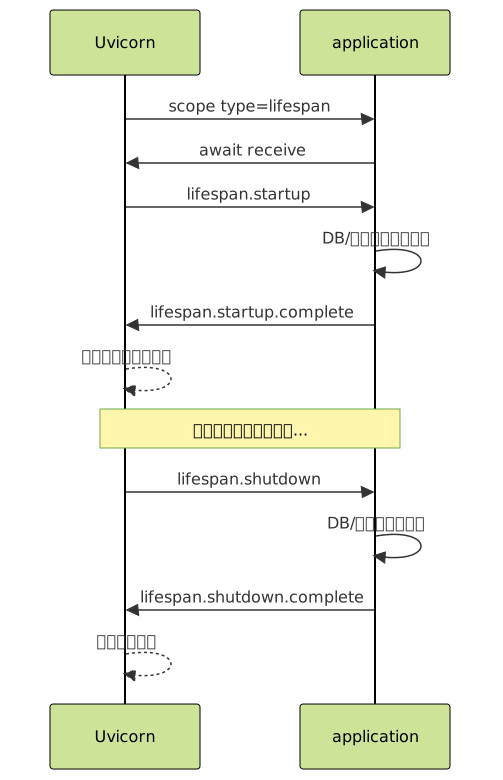
lifespan.startup イベントを受け取ったら初期化処理を実行し、成功すれば lifespan.startup.complete を送信します。
重要
ASGI サーバは lifespan.startup.complete を受け取るまでリクエストの受け付けを開始しません。つまり、データベース接続プールが準備できていない状態でリクエストが処理されることはありません。
3.8.2. 終了時クリーンアップ
ASGI サーバが SIGTERM や Ctrl+C を受信すると、lifespan.shutdown イベントが届きます。
アプリケーションはリソースを解放し、lifespan.shutdown.complete を送信してからサーバに終了を通知します。
起動と終了の流れをサーバの視点で整理してみましょう。
Uvicorn 起動
  │
  ├── application(scope={"type": "lifespan"}, receive, send) を呼び出し
  │     │
  │     ├── receive() → {"type": "lifespan.startup"}
  │     ├── DB接続プール初期化、キャッシュ初期化
  │     ├── send({"type": "lifespan.startup.complete"})
  │     │
  │     └── (receive() で次のイベントを待機)
  │
  ├── リクエストの受け付け開始
  │     ├── HTTP リクエスト処理 ...
  │     ├── WebSocket 接続処理 ...
  │     └── ...
  │
  ├── Ctrl+C / SIGTERM 受信
  │
  ├── lifespan の receive() が返す
  │     ├── receive() → {"type": "lifespan.shutdown"}
  │     ├── キャッシュ解放、DB接続プール解放
  │     └── send({"type": "lifespan.shutdown.complete"})
  │
  └── Uvicorn 終了
Tip
lifespan.startup.failed を送信した場合、サーバはリクエストの受け付けを開始せずにプロセスを終了します。データベースが起動していない場合やマイグレーションが未実行の場合に、不完全な状態でリクエストを処理してしまうことを防げます。
lifespan を使わない場合のクリーンアップは、Python の atexit モジュールやシグナルハンドラに頼ることになります。
しかし atexit は非同期関数を実行できず、シグナルハンドラの中で await を使うには工夫が必要です。
lifespan イベントは ASGI サーバのイベントループ上で実行されるため、非同期のクリーンアップ処理を自然に記述できます。
3.8.3. DB コネクションやキャッシュ初期化との関係
lifespan の仕組みを HTTP ハンドラと統合した完全なアプリケーションを構築しましょう。
# full_app.py
import json
import time

app_state = {
    "db_pool": None,
    "cache": None,
    "start_time": None,
}


async def handle_lifespan(scope, receive, send):
    while True:
        event = await receive()

        if event["type"] == "lifespan.startup":
            try:
                app_state["db_pool"] = await create_db_pool()
                app_state["cache"] = await create_cache()
                app_state["start_time"] = time.time()
                await send({"type": "lifespan.startup.complete"})
            except Exception as e:
                await send({
                    "type": "lifespan.startup.failed",
                    "message": str(e),
                })
                return

        elif event["type"] == "lifespan.shutdown":
            if app_state["cache"]:
                await app_state["cache"].close()
            if app_state["db_pool"]:
                await app_state["db_pool"].close()
            await send({"type": "lifespan.shutdown.complete"})
            return


async def handle_http(scope, receive, send):
    method = scope["method"]
    path = scope["path"]

    if path == "/health" and method == "GET":
        await receive()
        uptime = time.time() - app_state["start_time"]
        data = {
            "status": "ok",
            "uptime_seconds": round(uptime, 1),
            "db_pool": app_state["db_pool"] is not None,
            "cache": app_state["cache"] is not None,
        }
        await send_json(send, data)

    elif path == "/users" and method == "GET":
        await receive()
        # lifespan で初期化した DB プールを使用
        users = await app_state["db_pool"].fetch("SELECT * FROM users")
        await send_json(send, users)

    else:
        await receive()
        await send_json(send, {"error": f"Not Found: {path}"}, status=404)


async def application(scope, receive, send):
    if scope["type"] == "lifespan":
        await handle_lifespan(scope, receive, send)
    elif scope["type"] == "http":
        await handle_http(scope, receive, send)
    elif scope["type"] == "websocket":
        # WebSocket ハンドラ(前節で実装)
        pass


async def send_json(send, data, status=200):
    body = json.dumps(data, ensure_ascii=False).encode("utf-8")
    await send({
        "type": "http.response.start",
        "status": status,
        "headers": [
            [b"content-type", b"application/json; charset=utf-8"],
            [b"content-length", str(len(body)).encode()],
        ],
    })
    await send({"type": "http.response.body", "body": body})


# ダミー実装(前セクションと同じ)
class DummyPool:
    def __init__(self, name):
        self.name = name
    async def close(self):
        pass
    async def fetch(self, query):
        return [{"id": 1, "name": "Taro"}, {"id": 2, "name": "Hanako"}]

async def create_db_pool():
    import asyncio
    await asyncio.sleep(0.1)
    return DummyPool("database")

async def create_cache():
    import asyncio
    await asyncio.sleep(0.05)
    return DummyPool("cache")
uvicorn full_app:application --port 8000
# [lifespan] Starting up...
# [lifespan] Database pool initialized
# [lifespan] Cache initialized
# [lifespan] Startup complete — ready to accept requests

curl http://127.0.0.1:8000/health
# → {"status": "ok", "uptime_seconds": 3.2, "db_pool": true, "cache": true}

curl http://127.0.0.1:8000/users
# → [{"id": 1, "name": "Taro"}, {"id": 2, "name": "Hanako"}]

# Ctrl+C で停止
# [lifespan] Shutting down...
# [lifespan] Cache closed
# [lifespan] Database pool closed
# [lifespan] Shutdown complete
注釈
ここで app_state というモジュールレベルの辞書を使ってリソースを共有していますが、これは簡易的な実装です。実際のフレームワークではより構造化された方法を提供しています。
FastAPI は app.state オブジェクトを使い、lifespan コンテキストマネージャから自然にリソースを共有します。
# FastAPI での lifespan(参考)
from contextlib import asynccontextmanager
from fastapi import FastAPI

@asynccontextmanager
async def lifespan(app):
    # startup
    app.state.db_pool = await create_db_pool()
    app.state.cache = await create_cache()
    yield
    # shutdown
    await app.state.cache.close()
    await app.state.db_pool.close()

app = FastAPI(lifespan=lifespan)

@app.get("/users")
async def user_list():
    users = await app.state.db_pool.fetch("SELECT * FROM users")
    return users
yield の前がスタートアップ、後がシャットダウンに対応し、内部的には lifespan イベントの送受信に変換されます。
本節で手書きした handle_lifespan 関数の処理を、asynccontextmanager の構文糖で簡潔に表現したものです。
Django の ASGI モードでは、django.setup() がスタートアップ時の初期化を担い、データベース接続は ORM が管理します。
Django 自体は lifespan イベントのフックを公開していませんが、カスタムの ASGI ミドルウェアで lifespan を処理した上で Django の ASGIHandler にその他のイベントを委譲する構成が可能です。
lifespan を使わない場合の代替手段にはいずれも問題があります。
モジュールのトップレベルで初期化すると
awaitが使えず、同期的な初期化しかできません最初のリクエストで初期化する lazy initialization は最初のリクエストだけ遅くなる「コールドスタート」問題を抱え、同時に複数のリクエストが来た場合に初期化が重複するリスクもあります
グローバル変数への代入はテスタビリティを低下させます
Tip
lifespan はこれらの問題を解決し、「サーバが準備完了してからリクエストを受け付ける」という当然の順序を保証します。
本節で ASGI の3つのプロトコル(HTTP、WebSocket、lifespan)すべてを手書きで実装しました。 Vol.1「まずは 1 リクエストだけ処理するサーバを作る」で TCP ソケットから HTTP サーバを作り、Vol.1「WSGI が生まれた背景」で WSGI アプリを作り、本章で ASGI アプリを作るという段階的な実装を通じて、各層が何を解決しているかを体感してきました。 次節ではこの章全体を振り返り、トラブルシューティングの観点で整理します。
3.9. 生の ASGI を書く価値
本章では ASGI アプリケーションをフレームワークを使わずに手書きしてきました。HTTP のリクエスト受信とレスポンス送信、ルーティングの自作、ミドルウェアの実装、WebSocket のメッセージ交換、lifespan によるリソース管理、いずれも FastAPI や Django を使えば数行で書ける処理を、数十行かけて実装しました。 本節ではこの「遠回り」がなぜ必要だったのかを整理します。
Tip
「フレームワークを使えば簡単なのに、なぜ手書きするの?」という疑問に対する答えがこの節にあります。ぜひ最後まで読んでみてください。
3.9.1. FastAPI/Starlette の理解が深まる
FastAPI のコードを見てみましょう。
from fastapi import FastAPI

app = FastAPI()

@app.get("/users/{user_id}")
async def user_detail(user_id: int):
    return {"id": user_id, "name": "Taro"}
この5行のコードが動くためには、本章で手書きした処理のすべてが裏側で実行されています。
@app.get("/users/{user_id}") はデコレータベースのルーティングです。
本章の
RouterクラスではRouteオブジェクトにパスパターンの正規表現とハンドラ関数を保持し、dispatchメソッドでscope["path"]とのマッチングを行いましたStarlette の
Routerも本質的に同じことをしていますが、パスパラメータの型変換({user_id}をintに変換)、マウントポイントのサポート、WebSocket ルートとの統合といった機能が加わっています本章の自作ルーターを経験していれば、Starlette のルーティングコードを読んだときに「ああ、パスパターンをコンパイルしてマッチングしているのだな」と即座に理解できます
async def user_detail(user_id: int) というビュー関数は scope, receive, send を受け取りません。
FastAPI/Starlette がこの3引数を隠蔽し、
Requestオブジェクトと関数の戻り値からのResponse生成を自動化しています本章で
await receive()でボディを読み取り、await send()でレスポンスを送信する処理を手書きした経験があれば、FastAPI がRequest.body()やJSONResponseの内部で何をしているかを推測できます
return {"id": user_id, "name": "Taro"} という辞書の返却は、FastAPI が内部で JSONResponse に変換し、http.response.start と http.response.body の2つのイベントとして send に渡しています。
本章の send_json ヘルパーで json.dumps → encode → content-length 計算 → http.response.start → http.response.body という手順を明示的に書いた経験があるからこそ、この自動変換の裏側が「見える」のです。
ミドルウェアについても同様です。FastAPI で CORS ミドルウェアを追加する場合、以下のように書きます。
from fastapi.middleware.cors import CORSMiddleware

app.add_middleware(
    CORSMiddleware,
    allow_origins=["http://localhost:3000"],
    allow_methods=["*"],
    allow_headers=["*"],
)
この1行の裏側では、本章で実装した ASGI ミドルウェアと同じ構造が動いています。
CORSMiddleware.__call__ が send をラップし、http.response.start イベントを傍受して access-control-allow-origin ヘッダーを追加しています。
本章の SecurityHeadersMiddleware で send をラップしてヘッダーを追加したのとまったく同じパターンです。
Tip
CORS の設定で問題が起きたとき(たとえばプリフライトリクエストに正しいヘッダーが返らない場合)、ミドルウェアの send ラッパーが http.response.start イベントのどの時点でヘッダーを注入しているかを追跡できれば、原因の特定が格段に速くなります。
WebSocket も同じです。FastAPI で WebSocket エンドポイントを書く場合は以下のようになります。
@app.websocket("/ws")
async def websocket_endpoint(websocket: WebSocket):
    await websocket.accept()
    while True:
        data = await websocket.receive_text()
        await websocket.send_text(f"Echo: {data}")
websocket.accept()は内部でawait send({"type": "websocket.accept"})を呼んでいますwebsocket.receive_text()はawait receive()を呼んでwebsocket.receiveイベントのtextフィールドを返していますwebsocket.send_text()はawait send({"type": "websocket.send", "text": ...})を呼んでいます
前節で手書きした WebSocket のイベント送受信がそのまま WebSocket クラスのメソッドにカプセル化されていることが分かります。
3.9.2. middleware やサーバの挙動が見える
生の ASGI を書いた経験は、フレームワークの外側で起きる問題の理解にも直結します。
よく遭遇するエラーとその読み方を整理します。
WARNING: Invalid HTTP request received.: 本章でscopeの構造とreceiveのイベント型を理解していれば、「HTTP パースの段階でサーバが不正なリクエストを検出したのだ」と推測できます。scopeが構築される前の段階でエラーが起きているため、アプリケーションのログには何も残りません。RuntimeError: Unexpected ASGI message 'http.response.start':sendの呼び出し順序に違反していることを示します。本章でhttp.response.startを2回送ったときに発生するエラーを実験で確認した経験があれば、このエラーメッセージの意味を即座に理解できます。カスタムミドルウェアがsendを二重にラップしている場合や、例外処理ミドルウェアが既にレスポンスが開始された後に500レスポンスを送ろうとしている場合など、原因の候補を絞り込めます。WebSocket が突然切断される:
websocket.disconnectイベントのcodeフィールドを確認する発想が自然に浮かびます。code: 1006なら異常切断(ネットワーク断絶やプロキシのタイムアウト)、code: 1000なら正常切断です。前節でこのコードの意味を実装レベルで体験しているからこそ、ログに出力すべき情報と調査すべき層を判断できます。Lifespan protocol is not supported: アプリケーションがscope["type"] == "lifespan"を処理していないことが原因です。本章で lifespan ハンドラを実装した経験があれば、この警告の意味と対処法を理解できます。FastAPI のlifespanパラメータが内部で何をしているかも明確です。
本章で構築したアプリケーションの全体像を振り返りましょう。
application(scope, receive, send)
  │
  ├── scope["type"] == "lifespan"
  │     → handle_lifespan: DB/キャッシュの初期化と解放
  │
  ├── scope["type"] == "http"
  │     → LoggingMiddleware
  │       → RequestIdMiddleware
  │         → SecurityHeadersMiddleware
  │           → ErrorHandlingMiddleware
  │             → Router.dispatch
  │               → ハンドラ関数 (read_body, send_json)
  │
  └── scope["type"] == "websocket"
        → accept → receive/send ループ → finally クリーンアップ

この構造は FastAPI アプリケーションの内部構造と驚くほど似ています。
FastAPI は Starlette を基盤としており、Starlette は
scope["type"]による分岐、Routerによるディスパッチ、ミドルウェアの入れ子構造、Request/Responseクラスによるイベントの抽象化を提供しますFastAPI はさらにその上に Pydantic による型バリデーション、依存性注入、OpenAPI ドキュメント自動生成を加えています
本章で書いたコードはこの階層構造の最も低い部分に位置し、上位の層が何をしているかを理解するための土台です
本章のまとめ
Vol.1「まずは 1 リクエストだけ処理するサーバを作る」で「TCP ソケットから HTTP サーバを作る意味」を体感し、Vol.1「WSGI が生まれた背景」で「WSGI アプリを手書きする意味」を確認し、本章で「ASGI アプリを手書きする意味」を経験しました。いずれも、普段はフレームワークが隠してくれている処理を一度は自分の手で書くことで、問題が起きたときに内部を追跡できる力を得るという本書の方針に基づいています。
次節では、本章で実際に ASGI アプリケーションを書いた経験を踏まえ、実際の運用で遭遇する典型的な問題を取り上げます。
3.10. 現場で起きる問題
本章では ASGI アプリケーションを手書きで構築してきました。本節ではその経験を踏まえ、実際の運用で遭遇する典型的な問題を3つ取り上げます。
注釈
いずれもコードは一見正しく見えるのに本番環境で問題が起きるというタイプのバグです。ASGI のイベントモデルと非同期処理の特性を理解していなければ原因の特定が困難です。
3.10.1. sync 関数の呼び出しによるブロッキング
2.11 章(トラブルシューティングの観点)でもこの問題を取り上げましたが、本章で実際に ASGI アプリケーションを書いた今、より具体的なケースで掘り下げます。
本章で実装したルーティング付きアプリケーションに、画像のサムネイル生成エンドポイントを追加する場面を想像してください。
from PIL import Image
import io

@app.post("/thumbnails")
async def create_thumbnail(scope, receive, send):
    body = await read_body(receive)

    # PIL による画像処理 — CPU バウンドかつ同期的
    img = Image.open(io.BytesIO(body))
    img.thumbnail((200, 200))

    output = io.BytesIO()
    img.save(output, format="JPEG")
    thumbnail_bytes = output.getvalue()

    await send({
        "type": "http.response.start",
        "status": 200,
        "headers": [
            [b"content-type", b"image/jpeg"],
            [b"content-length", str(len(thumbnail_bytes)).encode()],
        ],
    })
    await send({"type": "http.response.body", "body": thumbnail_bytes})
await read_body(receive) までは非同期で問題ありませんが、Image.open と img.thumbnail は同期的な CPU バウンド処理です。
危険
5MB の画像を処理するのに500msかかるとすると、その500msの間イベントループ全体が停止します。同じイベントループ上で処理中のすべての HTTP リクエスト、WebSocket メッセージ、タイマーが影響を受けます。開発環境では自分一人しかアクセスしないため、この問題に気づきません。本番環境で10人が同時にサムネイル生成を要求すると、最後のユーザーは5秒近く待たされる可能性があります。しかもサーバのCPU使用率は低いままです。
ブロッキングの間、イベントループは「待っている」のではなく「止まっている」ため、CPU は遊んでいるのにリクエストが処理されないという不可解な症状が現れます。

問題の検出と対処の流れを示します。
Tip
asyncio のデバッグモードを使うと、100ms 以上かかるコールバックを自動的に警告してくれます。開発時は常に有効にしておくことをお勧めします。
# ステップ1: 問題の検出 — asyncio のデバッグモードで遅い処理を発見
import asyncio
import logging

logging.basicConfig(level=logging.WARNING)
loop = asyncio.get_event_loop()
loop.slow_callback_duration = 0.1  # 100ms以上のブロッキングを警告
# WARNING: Executing <Task ...> took 0.523 seconds
# ステップ2: スレッドプールへの逃がし
import asyncio

@app.post("/thumbnails")
async def create_thumbnail(scope, receive, send):
    body = await read_body(receive)

    # CPU バウンド処理をスレッドプールで実行
    loop = asyncio.get_event_loop()
    thumbnail_bytes = await loop.run_in_executor(
        None,
        generate_thumbnail,  # 同期関数
        body,
    )

    await send({
        "type": "http.response.start",
        "status": 200,
        "headers": [
            [b"content-type", b"image/jpeg"],
            [b"content-length", str(len(thumbnail_bytes)).encode()],
        ],
    })
    await send({"type": "http.response.body", "body": thumbnail_bytes})


def generate_thumbnail(image_bytes):
    """同期関数 — スレッドプールで実行される"""
    img = Image.open(io.BytesIO(image_bytes))
    img.thumbnail((200, 200))
    output = io.BytesIO()
    img.save(output, format="JPEG")
    return output.getvalue()
run_in_executor は同期関数をスレッドプールで実行し、完了するまでイベントループをブロックせずに await できます。PIL の処理中もイベントループは他のリクエストを処理し続けます。
同じ問題は、一見非同期に見えるコードでも発生します。以下はイベントループをブロックする処理の例です。
time.sleep(asyncio.sleepを使うべき)ファイルの同期読み書き(
open().read())同期版の ORM クエリ(Django の
Model.objects.all())subprocess.run
注釈
本章のミドルウェアで time.time() を使った処理時間計測は問題ありません(time.time() は即座に返るため)が、time.sleep() で待機を入れるとブロッキングが発生します。
3.10.2. 例外時にレスポンス途中で落ちる
本章の ErrorHandlingMiddleware で response_started フラグを追跡した理由を、実際のシナリオで説明します。
警告
ストリーミングレスポンス中に例外が発生すると、クライアントは200 OKを受け取りながらデータが途中で切れるという症状が起きます。原因が分かりにくいため、設計段階で注意が必要です。
@app.get("/users/export")
async def export_users(scope, receive, send):
    await receive()

    await send({
        "type": "http.response.start",
        "status": 200,
        "headers": [
            [b"content-type", b"text/csv"],
            [b"transfer-encoding", b"chunked"],
        ],
    })

    # ヘッダー行を送信
    await send({
        "type": "http.response.body",
        "body": b"id,name,email\n",
        "more_body": True,
    })

    # 100件目のデータ取得中にDBコネクションが切れる
    for i in range(1000):
        user = await fetch_user(i)  # i=100 で例外発生
        line = f"{user['id']},{user['name']},{user['email']}\n".encode()
        await send({
            "type": "http.response.body",
            "body": line,
            "more_body": True,
        })

    await send({"type": "http.response.body", "body": b"", "more_body": False})
100件目の fetch_user でデータベース接続エラーが発生した場合を考えてみましょう。
http.response.startと99件分のhttp.response.bodyはすでに送信済みですこの状態で
ErrorHandlingMiddlewareが例外を捕捉しても、ステータスコード200はクライアントに送信済みであるため500に変更することはできません
クライアント側で起きることは、CSV ファイルのダウンロードが途中で中断するという症状です。
ブラウザは200を受け取っているため「成功」と認識しますが、データは99行で切れています。
curl は curl: (18) transfer closed with outstanding read data remaining のようなエラーを表示します。
この問題への対処として、まずストリーミング前に全データを取得する方法があります。
# 対処法1: ストリーミング前に全データを取得
@app.get("/users/export")
async def export_users(scope, receive, send):
    await receive()

    # まず全データを取得(例外はレスポンス送信前に発生)
    try:
        users = [await fetch_user(i) for i in range(1000)]
    except Exception:
        await send_error(send, 500, "Failed to fetch users")
        return

    # 全データ取得成功後にレスポンスを開始
    await send({
        "type": "http.response.start",
        "status": 200,
        "headers": [[b"content-type", b"text/csv"]],
    })
    for user in users:
        line = f"{user['id']},{user['name']},{user['email']}\n".encode()
        await send({"type": "http.response.body", "body": line, "more_body": True})
    await send({"type": "http.response.body", "body": b"", "more_body": False})
# 対処法2: ストリーミング中のエラーをデータ内で通知
@app.get("/users/export")
async def export_users(scope, receive, send):
    await receive()

    await send({
        "type": "http.response.start",
        "status": 200,
        "headers": [[b"content-type", b"text/csv"]],
    })
    await send({
        "type": "http.response.body",
        "body": b"id,name,email\n",
        "more_body": True,
    })

    try:
        for i in range(1000):
            user = await fetch_user(i)
            line = f"{user['id']},{user['name']},{user['email']}\n".encode()
            await send({"type": "http.response.body", "body": line, "more_body": True})
    except Exception as e:
        # エラー情報をCSV内に書き込む(クライアントが検出可能)
        error_line = f"\n# ERROR: Export failed at row {i}: {e}\n".encode()
        await send({"type": "http.response.body", "body": error_line, "more_body": False})
        return

    await send({"type": "http.response.body", "body": b"", "more_body": False})
対処法 |
メリット |
デメリット |
|---|---|---|
対処法1: 全データ先取得 |
エラーハンドリングが明確 |
メモリを多く消費する |
対処法2: エラーをデータ内に埋め込み |
ストリーミングの利点を維持 |
クライアント側でのエラー検出が必要 |
どちらを選ぶかはデータサイズとユースケースに依存しますが、「レスポンス送信開始後は500に戻せない」という HTTP の根本的な制約を理解していれば、適切な設計判断ができます。
3.10.3. WebSocket 切断処理漏れ
前節でチャットルームの finally ブロックの重要性を強調しましたが、finally を書き忘れた場合に何が起きるかを具体的に示します。
危険
finally を書き忘れると「幽霊接続」がルームに残り続け、ブロードキャストのたびに大量のエラーが発生するようになります。時間が経つほど症状が悪化するため、本番環境でのデバッグが非常に困難になります。
# NG: finally がない実装
async def chat_handler(scope, receive, send):
    event = await receive()
    await send({"type": "websocket.accept"})

    room_name = extract_room_name(scope["path"])
    rooms[room_name].add(send)

    while True:
        event = await receive()

        if event["type"] == "websocket.receive":
            await broadcast(room_name, event["text"])

        elif event["type"] == "websocket.disconnect":
            rooms[room_name].discard(send)  # 正常切断時はここで除去
            break
        # ← ネットワーク断絶で receive が例外を出した場合、
        #    rooms から send が除去されないまま関数を抜ける
正常切断の場合は websocket.disconnect イベントが届き、rooms からの除去が実行されます。
しかしクライアントのネットワークが突然切断された場合(Wi-Fi が切れた、モバイルのトンネル通過中など)、ASGI サーバの実装によっては receive が例外を送出します。
この場合 while ループを抜けますが、rooms からの除去が実行されず、無効な send callable がルームに残り続けます。
この「幽霊接続」は次の問題を引き起こします。
ブロードキャスト時に無効な
sendに対してメッセージを送信しようとして例外が発生しますルームの人数カウントが実態と合わなくなります
時間が経つにつれて幽霊接続が蓄積し、ブロードキャストのたびに大量のエラーが発生するようになります
# OK: finally で確実にクリーンアップ
async def chat_handler(scope, receive, send):
    event = await receive()
    await send({"type": "websocket.accept"})

    room_name = extract_room_name(scope["path"])
    rooms[room_name].add(send)

    try:
        while True:
            event = await receive()

            if event["type"] == "websocket.receive":
                await broadcast(room_name, event["text"])

            elif event["type"] == "websocket.disconnect":
                break

    except Exception as e:
        print(f"WebSocket error in {room_name}: {e}")

    finally:
        # 正常切断、異常切断、例外、いずれの場合も実行
        rooms[room_name].discard(send)
        if not rooms[room_name]:
            del rooms[room_name]
さらに堅牢にするには、ブロードキャスト関数内でも送信失敗を検出して無効な接続を除去します。
async def broadcast(room_name, message):
    disconnected = set()
    for client_send in rooms.get(room_name, set()):
        try:
            await client_send({"type": "websocket.send", "text": message})
        except Exception:
            disconnected.add(client_send)
    for s in disconnected:
        rooms.get(room_name, set()).discard(s)
この二重の防御(finally による退出 + ブロードキャスト時の死活監視)は、実運用の WebSocket アプリケーションでは必須のパターンです。
HTTP の1リクエスト/1レスポンスモデルではリクエスト処理が終われば自然にリソースが解放されますが、WebSocket の長寿命接続ではリソースの明示的な管理が開発者の責務になります。
本章で取り上げた3つの問題は、すべて ASGI の非同期イベントモデルの特性から生じるものです。
問題 |
原因 |
|---|---|
同期ブロッキング |
イベントループの単一スレッド性 |
ストリーミング中の例外 |
「送信済みのレスポンスは取り消せない」という HTTP の制約 |
WebSocket の切断処理漏れ |
長寿命接続のリソース管理の責務 |
重要
これらの問題を理解し対処できることが、ASGI ベースのアプリケーションを本番環境で運用するための前提条件です。
次章では FastAPI の内部構造に踏み込み、本章で手書きした ASGI の処理を FastAPI と Starlette がどのように抽象化しているかを追跡します。